SpreadSheet - Editor of Microsoft Excel XLS files for iPad3.1
Publisher Description
+ Limited Time 90% off SALE - $9.99 ->$0.99
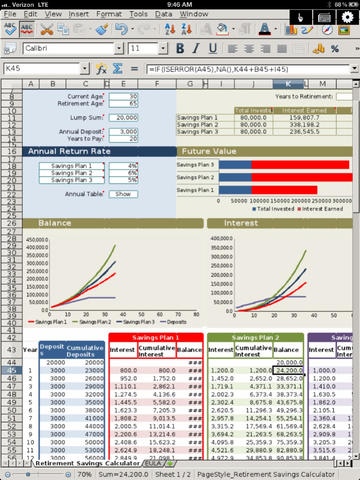
+ Create and edit Microsoft Excel (.xls and .xlsx) and Open Office Spreadsheet (.ods) on your iPad.
Spreadsheet Calculator & Editor Professional for iPad allows you to manage Excel and Open Office Spreadsheet on your iPad. You can view, create and edit Microsoft Office 2007 and 2010 spreadsheet (including xls and xlsx format), Open Office Open Spreadsheet and LibreOffice spreadsheet (.ods file format).
You can use this as a regular spreadsheet program or use it as a powerful calculator by entering complex formulas in cell.
You can edit files in cloud storage or transfer existing .xls or .xlsx from your PC to the iPad via Wifi Transfer or USB Sync. You can also edit existing spreadsheet stored in Dropbox, Google Docs, Google Drive and Box.com.
Spreadsheet Calculator & Editor Professional for iPad supports the following in editing spreadsheet files
+ View, create and edit Microsoft Word 2007-2010 spreadsheets (.xls & .xlsx)
+ View, create and edit Open Document Spreadsheet (.ods)
+ File manager for managing files including files stored with Dropbox, Google Docs, Google Drive and Box.com.
+ Transfer files using Wifi.
+ Support Date & Time formulas:
YEARFRAC, YEAR, WORKDAY, WEEKNUM_ADD, WEEKNUM, WEEKDAY, TODAY, TIMEVALUE, TIME, SECOND, NOW, NETWORKDAYS, MONTH, MINUTE, HOUR, EOMONTH, EDATE, EASTERSUNDAY, DAYS360, DAYS, DAY, DATEVALUE, DATE and more...
+ Support Finance formulas:
SYD, RECEIVED, PV, ISPMT, IRR, EFFECTIVE, EFFECT_ADD, DURATION_ADD, DISC, DDB, DB, AMORLINC and many others
+ Support Logical Conditionals:
AND, OR, FALSE, IF, NOT, TRUE
+ Support Mathematical Functions:
CONVERT, FLOOR, SIGN, MROUND, COUNTBLANK, ACOS, ACOSH, SQRT, ACOT, ACOTH, ASIN, ASINH, ATAN, ATANH, COS, COSH, COT, SQRTPL, COTH, DEGREES, EXP, FACT, INT, EVEN, GCD, LOG, LOG10, CEILING and many more!
+ Support Statistical Functions:
RSQ, INTERCEPT, CHITEST, CHISQDIST, CHIDIST, BINOMDIST, BETADIST, GAUSS, GAMMADIST, FISHERINV, FINV and many more...
+ Charting support.
Spreadsheet Calculator & Editor Professional for iPad is a cloud based solution hosting the popular LibreOffice which is a fork of the popular Open Office which has been downloaded more than 100M times.
DISCLAIMER -
- Not all documents can be opened or edited successfully. Some opened and saved documents may result in a loss of formatting due to formats in compatibility. If you are unsure, you can email us your non-confidential document to our support email to help you test if the app can open the documents successfully for you.
- OpenOffice.org is a registered trademark of Oracle.
- LibreOffice is a trademark of The Document Foundation.
- Microsoft is a registered trademark of Microsoft Corporation in the United States and other countries.
- This app is not affiliated with, endorsed, or sponsored by LibreOffice, OpenOffice or Microsoft
- This app is a cloud based and hosted solution and requires users to be online for its editing features.
- If you are interested in using LibreOffice on desktop computers, please visit www.libreoffice.org
Requires iOS 4.3 or later. Compatible with iPad.
About SpreadSheet - Editor of Microsoft Excel XLS files for iPad
The company that develops SpreadSheet - Editor of Microsoft Excel XLS files for iPad is Appsverse Inc.. The latest version released by its developer is 3.1.
To install SpreadSheet - Editor of Microsoft Excel XLS files for iPad on your iOS device, just click the green Continue To App button above to start the installation process. The app is listed on our website since 2012-06-12 and was downloaded 6 times. We have already checked if the download link is safe, however for your own protection we recommend that you scan the downloaded app with your antivirus. Your antivirus may detect the SpreadSheet - Editor of Microsoft Excel XLS files for iPad as malware if the download link is broken.
How to install SpreadSheet - Editor of Microsoft Excel XLS files for iPad on your iOS device:
- Click on the Continue To App button on our website. This will redirect you to the App Store.
- Once the SpreadSheet - Editor of Microsoft Excel XLS files for iPad is shown in the iTunes listing of your iOS device, you can start its download and installation. Tap on the GET button to the right of the app to start downloading it.
- If you are not logged-in the iOS appstore app, you'll be prompted for your your Apple ID and/or password.
- After SpreadSheet - Editor of Microsoft Excel XLS files for iPad is downloaded, you'll see an INSTALL button to the right. Tap on it to start the actual installation of the iOS app.
- Once installation is finished you can tap on the OPEN button to start it. Its icon will also be added to your device home screen.
